

Enabling memories
Only Organization Admins can turn memory on or off for the organization.- Go to Settings → Organization Settings → Ask AI → General.
- Under Review AI agent turns, toggle Enable AI agent memories on.
How it works
Memory is fully automatic:- You keep working. Ask questions, correct answers, and give thumbs up / thumbs down feedback in the web app or Slack the same way you always have.
- The agent reviews idle threads in the background. A few hours after a thread goes quiet, an LLM reads it and decides whether anything durable was learned — an explicit correction, a business definition you taught it, a preference for how you like answers presented, or a failure it recovered from.
- Useful learnings become memories. If the thread contained something worth remembering, one small memory is saved. If it didn’t, nothing is saved.
- A daily curation pass keeps the corpus clean. Duplicate memories are merged, memories replaced by newer corrections are superseded, and memories about explores or fields that no longer exist are retired.
What agents learn from
Memory is drawn from the everyday things you already do with the agent:- The questions you ask. Recurring conventions (“revenue means net after refunds”) get remembered so you don’t have to restate them.
- Corrections you make. When you tell the agent it used the wrong metric, filter, or table, the correction is captured so the same mistake stops recurring.
- Feedback you leave. Thumbs down with a written note is the strongest signal. The clearer the note, the better the future memory.
- Preferences you state. “Always give me a table” or “prefer bar charts for categorical breakdowns” become defaults for your future conversations.
Memories are scoped to you
Each memory belongs to the person whose thread it came from, and it is only ever used in that person’s own conversations with the agent. Two people asking the same question can legitimately see different data because of user attributes and row-level access, so a memory learned from your thread is never injected into someone else’s answer. Practically, this means:- Memories from your web threads are used only for you.
- In a shared Slack thread, memories are attributed to the thread’s owner and used for that owner’s turns.
- Reading a memory requires the same access as reading the thread it came from.
Citations
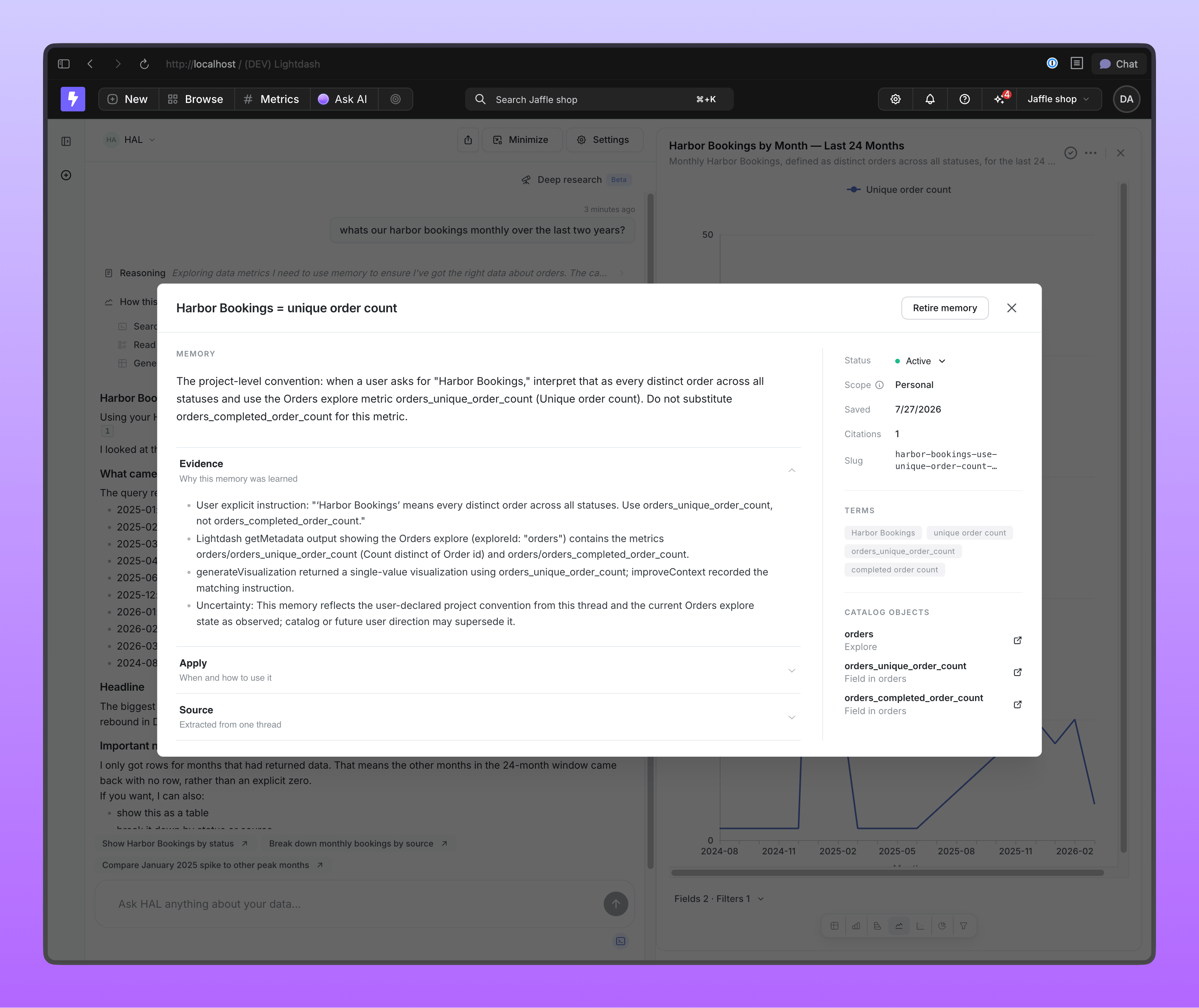
When the agent uses a memory to inform an answer, it cites it inline:- In the web app, the citation renders as a small chip next to the sentence it supports. Clicking the chip opens a read-only page showing the memory’s contents and where it came from.
- In Slack, citations render as native Slack citation elements linking to the same memory page.
Admin visibility
Organization admins get a memories tab that lists memories across users and agents, with:- The memory’s content and provenance (source thread, or the memories it was consolidated from).
- Its status — active, superseded, or retired.
- Its scope label —
userfor personal preferences and corrections,projectfor memories that look like general project knowledge and are candidates for promotion into shared context.
Promoting a memory to project context
A memory is personal by design, but sometimes what one person taught the agent is knowledge the whole project needs. Promotion is how a memory becomes a project-context entry that every agent answer in the project reads. Promotion never publishes directly. It files a nomination on the Reviews board, which is the same board that handles findings from likely-wrong answers. A reviewer approves or dismisses it, and only an approved, merged pull request lands the entry inlightdash.project_context.yml.
Who can promote
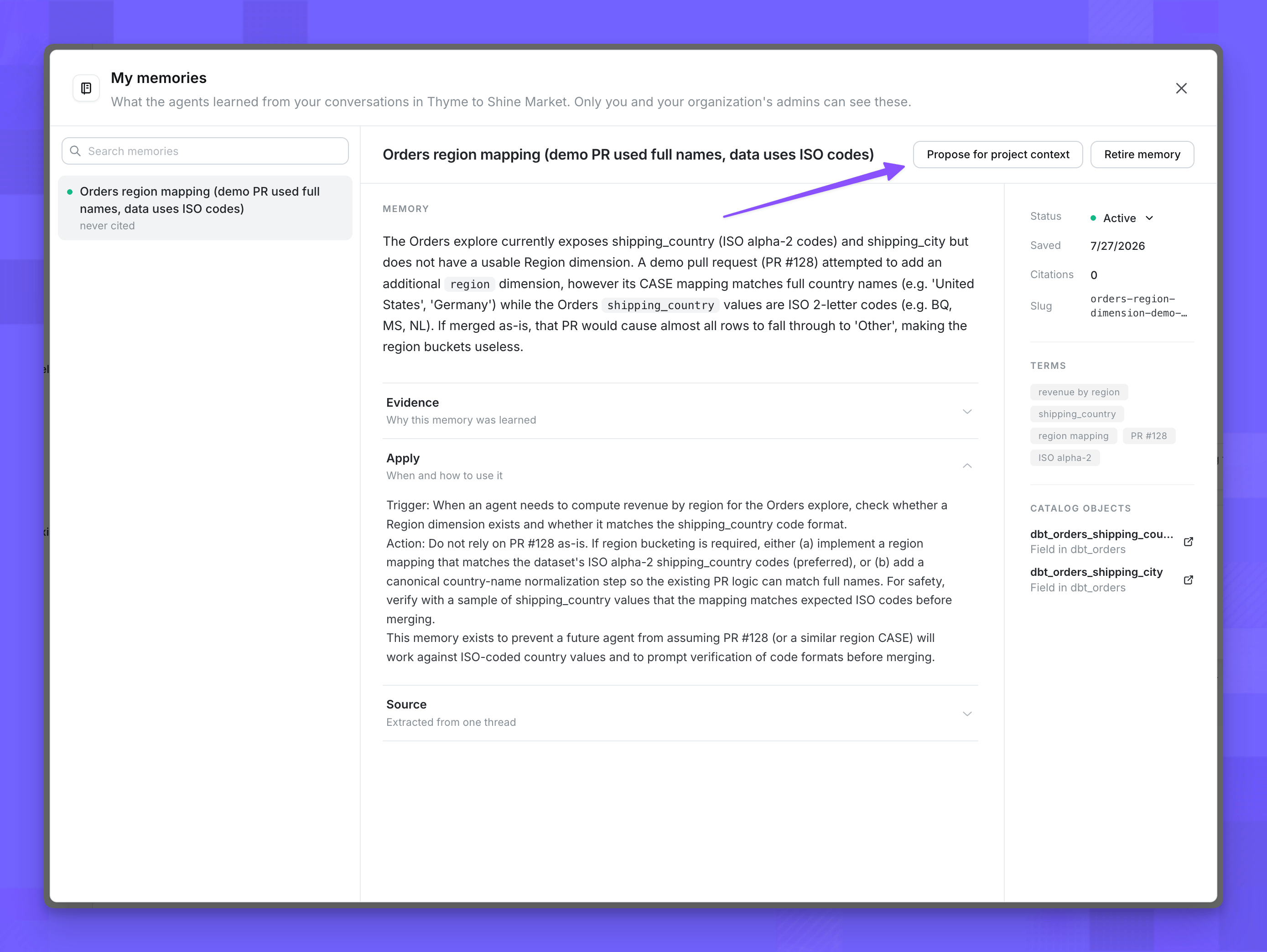
Anyone who can read a memory can nominate it:- Memory owners see a Propose for project context action on their own memory page.
- Organization admins see the same action on any memory in the admin memories tab.
lightdash.project_context.yml writeback set up through Reviews).
What happens when you promote
- You nominate. Click Propose for project context on the memory and optionally add a reason. A new review item is filed on the Reviews board, sourced from the memory, with the proposed project-context entry and the writeback diff preview attached.
- The board reviews it. A reviewer sees the memory’s wording, the exact
lightdash.project_context.ymlchange it would make, and a link back to the source memory for provenance. They can approve, dismiss, or leave it in triage. - Approval opens a pull request. Approving runs the same project-context writeback used by Reviews findings — a pull request against your dbt repository adding or updating the entry.
- Merging finishes the promotion. When the pull request merges, the source memory flips to a terminal
promotedstatus. The memory page becomes read-only and links its review item; the new entry now serves every user in the project.
What is not included in memory
A few things are deliberately kept out:- Preview projects are excluded, so throwaway environments don’t pollute memory.
- Content from external MCP tools can never be turned into a durable memory.
- Point-in-time values (specific numbers, dated results) are not remembered — only durable conventions, definitions, preferences, and failure recoveries.
- One-off requests are not turned into standing preferences. A preference needs standing-instruction phrasing (“always”, “from now on”, “I prefer”) or to recur across the thread before it becomes a memory.
Memory vs. project context
Memory and project context both improve future agent answers based on what happens in chat, but they solve different problems and apply in different ways.
If you also want to hand the agent context upfront (a glossary, fiscal calendar, internal definitions) without waiting for either loop, use knowledge documents.
Use memory for in-the-moment course corrections that stick to you, project context to improve every agent in the project at the source, and knowledge documents when you can hand the agent the answer upfront. When a personal memory turns out to be knowledge the whole project needs, promote it to project context so every agent answer benefits.
Frequently asked questions
Is memory per-user? Can admins see all memories? Yes — memories are private to their owner and are never injected into anyone else’s conversations. Organization admins get an audit tab that lists memories across users and agents, but reading a memory there never adds it to the admin’s own agent context. Does memory work without project context set up? Yes. Memory and project context are independent features. Memory does not require a connected GitHub or GitLab repository or any project context configuration to work. What happens when I switch the agent’s model? Nothing. Memories are stored as plain text and are model-agnostic, so switching the agent’s model does not invalidate or change existing memories. Can I correct or remove something the agent learned? Yes. Open the memory from its citation chip or the memories page and retire it — retired memories are never injected into future answers. You can reactivate a retired memory from the same page if you change your mind. Can I share a memory with other people on my project? Not directly — memory itself is always personal. If a memory contains knowledge that would help the whole project, promote it to project context. Promotion goes through the Reviews board and lands the entry inlightdash.project_context.yml via a pull request, so approved knowledge is shared through project context rather than through memory itself.
What happens if memory is disabled after it has been used?
Learning and injection stop immediately: no new memories are saved, and existing memories are no longer added to answers. The memories themselves are retained, so if memory is re-enabled later, they resume being used without any data loss.